Free Online Games
A neutral guide to the landscape of free online games on the modern web: how the medium has evolved since the Flash era, where free games live today, how they make money, and what to watch out for.
What this guide is
Online gaming has changed dramatically since the early 2010s. Adobe ended support for Flash at the end of 2020, and the big portal era — Kongregate, Newgrounds, Miniclip — gave way to HTML5, WebGL, free-to-play battle-pass models and a thriving indie scene on itch.io. This guide explains what is out there today, in plain English. It is written for curious players, parents and teachers who want context rather than a download button.
The pages describe categories, platforms and concepts, and they point to primary sources and well-established references where that helps. Games are named as examples, never as rankings: a title appearing here means it illustrates a point, not that it is the best of its kind.
What “free” means in practice
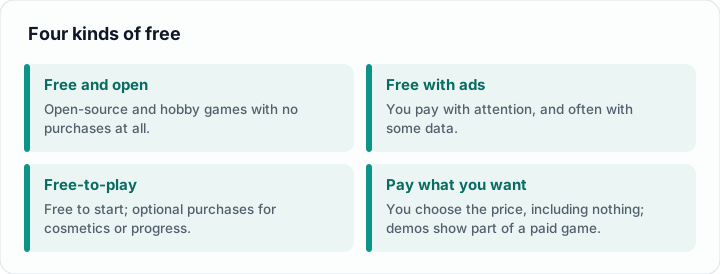
“Free” covers several quite different arrangements, and knowing which one you are looking at is the single most useful habit for any player or parent.
- Free and open. Open-source games and many hobby projects have no purchase of any kind. The code is public, and the game exists because someone wanted to make it.
- Free with advertising. Most browser portals and many casual mobile games show ads between levels or around the game window. You pay with attention, and often with some data.
- Free-to-play with optional purchases. The game is free to start, and money is asked for cosmetics, convenience or progression. Whether this is harmless or pressuring depends entirely on what is sold and how.
- Pay-what-you-want and demos. Many independent titles let you choose the price, including nothing, and demos give a limited slice of a paid game.
A quick test: ask what the game wants from you after the first ten minutes. A request to create an account, share contact details or buy a currency pack tells you more about the business model than the word “free” on the page. Terms such as F2P, IAP and battle pass are explained in the glossary.
How the web changed for games
For about fifteen years, Flash was the default way to deliver a game in a browser. It needed a plug-in, it had a poor security record, and it never worked on phones. Its end in December 2020 closed a chapter, but the web platform had already grown up around it. Modern browsers draw 2D graphics with the Canvas API, accelerated 3D with WebGL, sound with the Web Audio API, and can run compiled code at near-native speed through WebAssembly. A game today is simply a web page, which is why it can start with a single click and run on a laptop, a tablet or a school Chromebook.
That shift has consequences you can see as a player. There is nothing to install, so there is nothing to uninstall. The game sits inside the browser’s security sandbox, which limits what it can do to your computer. On the other hand, browser tabs can be closed, throttled or lose their saved data if you clear your browsing history, so progress is less permanent than in an installed game. The browser games page goes through the technology, the platforms and the preservation of the old Flash catalogue.
Where free games live
Free games are spread across several kinds of place, and each has its own character.
- Browser portals collect casual HTML5 games, usually supported by advertising.
- Community sites such as Newgrounds host creator-made games, animation and music with a long history of user submissions.
- itch.io is the main home of independent work, game-jam entries and experiments, many of them playable in the browser. See indie games and itch.io.
- Game stores and launchers list large free-to-play titles, which usually need a download and an account.
- Mobile app stores carry a huge range of free apps, with advertising and in-app purchases built into most of them. The trade-offs are compared in mobile versus browser.
If you are looking for people to play with, the free multiplayer page explains how team shooters, battle royales and arena games are funded and what to expect from their communities.
Finding something you will enjoy
Genre labels are the quickest filter, even though they are loose. If you like short sessions, look at puzzle and casual games. If you like planning, try strategy or card games. If you want something that plays itself while you do other things, the idle and clicker genre exists for exactly that. The genres page describes each label with examples and explains why many modern games cross several of them.
A simple routine works well for trying something new:
- Pick a genre or a mood rather than a title, for example “a calm puzzle game”.
- Search a well-known platform and filter for free and, if you want no install, playable in the browser.
- Read the description and a few comments before you start. Look for notes on advertising, purchases or required accounts.
- Play for ten minutes. If it feels good, continue; if it keeps interrupting you, leave without a second thought.
Staying safe and in control
Most free games are exactly what they say they are, but the free-games corner of the internet also attracts imitation sites, misleading download buttons and phishing attempts aimed at game accounts. The habits that matter most are simple: use the official site of a game or platform, be sceptical of “free currency” offers, never share a password, and use a unique password with two-step verification on any account that holds purchases.
For parents and teachers, the useful controls are spending limits, restricted chat settings and a conversation about what the child is playing. None of this needs to be dramatic. The safety and privacy page covers the practical steps in a calm, factual way, including how to check that a site is what it claims to be.
Games for everyone
Accessibility decides whether a game can be played at all by many people. Subtitles, colour-blind options, remappable controls, adjustable difficulty and the ability to pause or slow a game make a real difference, and they usually help every player, not only those with a disability. Browser games and indie titles are often good at this because small teams can iterate quickly, but quality varies. The accessibility page lists the features worth looking for and the guidelines that developers use.
Topics
- Browser gamesLife after Flash: HTML5, WebGL, .io games and the platforms that host them today.
- GenresPuzzle, strategy, casual, RPG, card, MMO, racing, idle, roguelike — with examples.
- Free multiplayerFortnite, Valorant, League of Legends, Apex — the F2P economy in 2026.
- Mobile vs. browserWhen each makes sense, ad models, IAP traps and parental-control angles.
- Indie & itch.ioGame jams, browser-playable submissions and the pay-what-you-want economy.
- Safety & privacyPhishing, fake-download sites, account hijacking and how to verify a host.
- AccessibilityColor-blind modes, subtitles, key remapping and the Game Accessibility Guidelines.
- GlossaryF2P, IAP, MMO, MOBA, gacha, season pass — the vocabulary, plainly explained.
How to use this guide
If you are returning to games after a long break, start with browser games to see what replaced Flash, then read genres. If you are a parent or teacher, begin with safety and privacy and keep the glossary open for unfamiliar terms. If you simply want something to play this evening, the checklist above and a game jam page on itch.io will usually get you there faster than any list could. Recommended reading from outside this site is collected under links.
Frequently Asked Questions
- Is everything described here actually free?
Most of it, but “free” in 2026 usually means free to download or open in a browser. Many titles earn money through advertising, cosmetics, battle passes or optional in-app purchases. The guide explains which model a game type uses, so you can see where the catch is before you start playing.
- Are free online games safe for children?
Many are, but safety depends on the platform and the settings rather than on the word “free”. Look at chat features, advertising and purchase options, and set spending limits where they exist. The safety and privacy page lists practical, calm steps for parents and teachers.
- Can I still play games without installing anything?
Yes. Modern browsers run games built with HTML5, WebGL and WebAssembly directly in a tab, on laptops, tablets and phones. Portals, community sites and itch.io all offer browser-playable titles. Large free-to-play shooters and online role-playing games usually still need a download, though.
- What happened to Flash games?
Adobe ended support for Flash Player on 31 December 2020. Many popular games were rebuilt with web standards, and preservation projects such as Flashpoint and the Ruffle emulator keep a large part of the old catalogue playable. See browser games for details.
- Who is this guide for?
Anyone who wants a neutral overview: players who have not kept up since the Flash era, parents and teachers who want to understand what young people play, and students or writers who need a plain primer on the modern free-online-games landscape.